If you are looking for a crypto payment API, you probably do not need another explanation of cryptocurrency. You need to know how your website, app, or platform can create crypto payments, track them, confirm when funds arrive, and connect the result to your existing order or account system.
That is exactly what a crypto payment API is designed to do.
Instead of building wallet infrastructure, monitoring blockchains, calculating payment amounts, and checking transactions manually, your application communicates with a payment infrastructure provider through an API. Your system creates the payment request, the provider manages the blockchain-facing process, and your backend receives the information it needs to complete the order.
This guide explains how that process works, when an API is the right integration method, what to look for in a crypto payment API, and how the same architecture works with OxaPay.
What Is a Crypto Payment API?
A crypto payment API is a programmatic interface that connects your application to cryptocurrency payment infrastructure.
Your backend sends information about a payment, such as the amount, currency, and order reference. The payment provider then creates the payment session and handles the blockchain-related processes needed to receive and track the transaction.
Once the payment progresses, the API gives your application structured information about its status.
In practice, this means your development team does not need to build every part of the crypto payment infrastructure internally.
The API can handle tasks such as generating payment invoices, providing payment addresses or hosted checkout pages, monitoring transactions, tracking blockchain confirmation, sending payment status updates, and retrieving transaction information.
The important distinction is automation.
A manually generated crypto address lets someone send you funds. A crypto payment API connects that payment to a business process.
An order can be created, paid, confirmed, recorded, and fulfilled without someone manually checking the blockchain or matching transactions to customers.
How Does a Crypto Payment API Work?
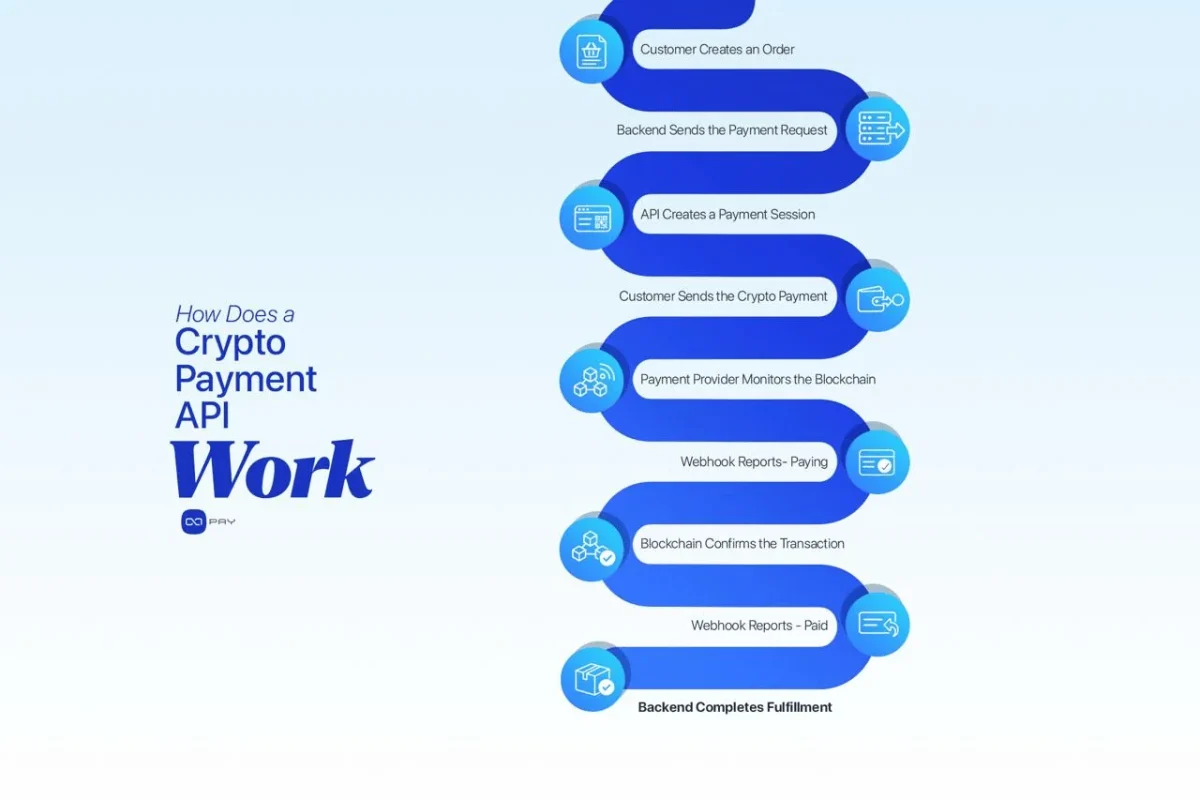
Although implementations differ between providers, most crypto payment APIs follow the same basic payment lifecycle.
First, a customer creates an order or starts a payment inside your website or application.
Your backend then sends a request to the payment API containing information such as the order amount, pricing currency, internal order ID, and callback URL.
The API creates a new payment session. Depending on the integration model, the customer may be redirected to a hosted payment page or shown payment information directly inside your interface.
The customer chooses the appropriate cryptocurrency and network and sends the transaction from their wallet.
From this point, the payment provider monitors the relevant blockchain.
When the transaction is detected, your system can receive an intermediate payment status. Once the required blockchain confirmation process is complete, the provider sends another update indicating that the payment has reached its confirmed state.
With OxaPay, payment Webhooks can report a payment as Paying while it is awaiting confirmation and later as Paid once the payment has been confirmed and credited. Businesses should normally complete fulfillment based on the confirmed Paid state rather than the customer’s browser redirect alone.
Your backend can then automatically update the order, activate the service, credit the customer’s account, or continue whatever business process depends on that payment.
What Does the API Actually Remove From Your Workload?
Without a payment API, accepting cryptocurrency at scale creates several operational problems.
You need to determine which transaction belongs to which order. Monitoring different networks is another part of the process, along with checking whether a transaction has received enough confirmations. Payment amounts, expiration periods, and underpayments also need to be managed. When something does not match, your team may also need to handle the resulting customer support issues.
A crypto payment API moves much of this infrastructure into a standardized payment layer.
Your application still controls the business logic. However, it receives structured payment events instead of having to interpret raw blockchain activity itself.
This separation becomes especially important as payment volume increases.
When Should You Use a Crypto Payment API?
An API is usually the right choice when crypto payments need to become part of your application rather than remain a separate manual payment process.
For example, an e-commerce backend may need to connect each crypto payment directly to an order. A SaaS platform may need to activate access automatically after payment. A marketplace may need payments to reference specific users or transactions. A gaming or digital platform may need to credit an internal balance after a confirmed deposit.
A custom integration also makes sense when you need greater control over checkout behavior, payment settings, transaction tracking, or your own user interface.
However, not every business needs an API.
If you only need to send occasional payment requests, a Payment Link may be simpler. If you operate a supported CMS or e-commerce platform, a ready-made payment plugin may also provide the required automation without custom development.
The API becomes valuable when your payment workflow needs to communicate directly with your own systems.
What Should You Look for in a Crypto Payment API?
A payment API should not be evaluated only by how easily you can send the first request.
Production payments require much more than a working endpoint.
Important areas to evaluate include:
- Clear payment lifecycle: Your application should be able to distinguish between created, detected, confirming, completed, and unsuccessful payment situations.
- Reliable Webhooks: Payment events should reach your backend automatically, with a secure method for validating their authenticity.
- Payment lookup: Your system should be able to retrieve payment information independently when a Webhook is delayed or further verification is required.
- Order references: Payments should connect cleanly to your own order or customer identifiers.
- Sandbox testing: Your developers should be able to test the complete payment lifecycle before using real funds.
- Currency and network flexibility: The API should support the assets and blockchain networks your customers actually use.
- Checkout options: Different businesses may need a hosted payment experience, a custom interface, or persistent deposit addresses.
- Operational controls: Features for underpayments, conversion, withdrawals, and payment expiration can reduce manual work later.
- Documentation and error handling: Good documentation matters even more when something fails than when the first integration succeeds.
The goal is not simply to make an API request work. The goal is to build a payment flow that remains predictable when real customers, delayed transactions, repeated callbacks, and operational edge cases appear.
Crypto Payment API Integration Options with OxaPay
OxaPay provides several payment models through its Merchant API, allowing businesses to select the structure that matches their product instead of forcing every payment into the same checkout flow.
Merchant Invoice
Invoice payments are the most straightforward option for many online businesses.
Your backend creates an invoice for a specific amount. OxaPay returns a payment session that can direct the customer to the hosted payment experience.
The customer completes the payment while OxaPay handles payment presentation, currency and network selection, transaction monitoring, and status updates.
This model works well for e-commerce orders, digital products, SaaS purchases, service payments, and other transaction-based flows.
Merchant White Label
White Label is designed for businesses that want more control over the payment experience.
Instead of relying on a hosted invoice page, the API can provide information such as the payment address, amount, network, expiration time, and QR-related payment details so that the merchant can present the payment process through its own interface.
This is useful when payment needs to feel like a native part of your application.
Merchant Static Address
Some applications do not operate around individual checkout sessions.
A platform may instead need to assign a consistent crypto deposit address to a particular user or account. OxaPay’s Static Address API supports this model by creating an address that can remain associated with that user while payment events are still reported back to the merchant system.
This approach can be useful for account deposits, platforms with internal balances, marketplaces, and applications where users make repeated transfers. A Static Address with no transactions for six months is revoked, so applications should account for address lifecycle management.
How to Integrate OxaPay’s Crypto Payment API
For a standard online checkout, the Invoice API provides a useful starting point.
1. Create a Merchant API Key
Start by creating your OxaPay account and generating a Merchant API Key.
The API key authenticates requests from your backend, so it should always remain on the server side. Never place it in front-end JavaScript, public repositories, or client-side applications.
2. Create the Payment From Your Backend
Your server creates the payment when a customer reaches the appropriate stage of your checkout or application workflow.
The current OxaPay Invoice API uses the POST /v1/payment/invoice endpoint. Authentication is provided through the merchant_api_key request header. The payment amount is required, while settings such as pricing currency, invoice lifetime, callback URL, return URL, internal order ID, and other payment behavior can be supplied according to the requirements of the transaction.
This request should originate from your backend rather than the customer’s browser.
3. Connect the Payment to Your Internal Order
When the API creates the payment, keep the payment’s track_id together with your own order_id.
This relationship is important.
Your internal order ID tells your application which purchase or user action the payment belongs to. The OxaPay track ID lets your application retrieve the corresponding payment information from the payment system later.
OxaPay provides a Payment Information endpoint that allows payment details to be retrieved using the track_id.
That gives your system another way to verify payment information when needed.
4. Let the Customer Complete the Payment
After the payment session is created, present the appropriate payment experience to the customer.
With Invoice, this generally means using the hosted payment flow. With White Label, your application can instead present the supplied payment information through its own interface.
Keep the browser experience separate from your final payment decision.
A customer reaching a success page does not prove that the blockchain transaction has completed.
Your backend should rely on server-side payment information.
Use Webhooks as Part of the Payment System
Webhooks are one of the most important parts of a crypto payment API integration.
Instead of repeatedly asking the API whether a transaction has changed, your application provides a callback_url. OxaPay sends payment information to that endpoint when relevant payment states change.
However, receiving a Webhook is only the first step.
Your application must verify that it actually came from OxaPay.
OxaPay signs Merchant Webhooks using HMAC-SHA512. Your backend should calculate the HMAC from the raw POST data using the Merchant API Key and compare it with the value supplied in the HMAC request header.
After validation, process the event according to its payment status.
When the payment reaches Paying, OxaPay has detected the payment and it is still being processed or awaiting the required blockchain confirmation. When the status reaches Paid, the payment has been confirmed and credited, and the corresponding goods or services can safely move to their fulfillment stage.
Your callback endpoint should also return HTTP 200 with the expected ok response after successful processing. OxaPay retries unsuccessful Webhook deliveries, so your payment processing logic should be safe if the same event reaches your system more than once. For implementation details, use the OxaPay Webhook documentation.
Test the Complete Payment Lifecycle
A successful API request does not mean the integration is ready for production.
You should test the complete lifecycle.
That includes creating the payment, presenting it to the customer, receiving payment status updates, validating the Webhook, updating your order, and preventing duplicate fulfillment.
You should also test situations where the customer does not follow the expected path.
For example, what happens if they close the checkout page? What happens if your callback endpoint temporarily fails? Can your application retrieve the payment using its track ID? Does a repeated Webhook create a duplicate order update?
OxaPay’s current Invoice API supports Sandbox operation through the sandbox parameter in the payment request, allowing the same integration flow to be tested before live transactions are introduced.
Testing these cases before launch prevents payment edge cases from becoming customer support problems later.
Managing More Than Basic Payments
Once the basic integration works, payment operations usually become the next concern.
For example, a business may want to tolerate small payment differences instead of manually resolving every underpayment.
OxaPay’s Invoice API supports under_paid_coverage for defining an acceptable payment difference and mixed_payment for allowing the remaining amount to be covered with another currency when enabled.
Businesses that want to reduce exposure to cryptocurrency price movements can also use the to_currency option to convert received crypto payments to USDT where supported. Auto Withdrawal can also route received funds to a configured wallet according to the merchant’s settings.
These features matter because the payment API is not only responsible for checkout. It can also reduce the operational work that happens after the customer sends the transaction.
Building a Production-Ready Crypto Payment API Integration
A good production integration keeps several responsibilities clearly separated.
Your backend creates payments and stores the relationship between the payment and the business object it represents.
The payment provider monitors blockchain activity.
Signed Webhooks communicate payment state changes.
Your backend validates those events before changing an order or customer balance.
The Payment Information API provides an independent way to retrieve the current payment record.
Finally, fulfillment happens only after the payment has reached the state your business considers complete.
This architecture is more reliable than treating a crypto payment as a simple wallet transfer.
It turns the transaction into a controlled part of your existing payment system.
What Comes Next?
A crypto payment API is most valuable when crypto payments need to operate automatically inside your website, application, marketplace, or platform.
Start with the simplest integration model that solves your actual problem.
For many businesses, that means creating an invoice from the backend, connecting it to an internal order ID, receiving signed Webhooks, and fulfilling the order only after confirmation.
If your product later requires a fully integrated checkout experience, White Label can provide greater control over the interface. If users need repeat deposit addresses, Static Address provides a different payment model without forcing every transfer through a new checkout session.
The important part is not adding every possible payment feature from the beginning.
It is building a payment flow that your application can create, track, verify, and reconcile reliably.
OxaPay’s Merchant API provides these different integration paths through the same payment infrastructure, allowing businesses to start with a simple invoice flow and expand their payment architecture as their requirements grow.