
Accepting cryptocurrency payments no longer requires building a custom payment system from scratch. Today, many businesses can start using crypto payment plugins to accept Bitcoin, USDT, Ethereum, and other cryptocurrencies directly on their existing platforms with minimal setup effort and technical complexity.
For online stores, membership sites, hosting providers, and digital product businesses, plugins offer the fastest way to enable crypto payments without weeks of development work. However, while plugins are ideal for quick integration and standard workflows, some businesses may later need API-based solutions when they require more advanced customization, scalability, or complex payment logic.
What Are Crypto Payment Plugins?
A crypto payment plugin is a pre-built software extension that connects an existing platform to a cryptocurrency payment gateway.
Instead of developing wallet management, payment monitoring, invoice generation, and confirmation tracking systems manually, the plugin provides these functions through an installation package that works with a specific platform.
For example, a WooCommerce store owner can install a crypto payment plugin and begin accepting cryptocurrency payments without modifying the store’s core code. The plugin handles payment creation, payment status updates, transaction monitoring, and order synchronization automatically.
The same concept applies to platforms such as WHMCS, Easy Digital Downloads, membership systems, billing platforms, and many other business applications.
Why Businesses Use Crypto Payment Plugins
The main reason businesses choose plugins is simplicity.
Building a custom crypto payment integration requires development resources, testing, security reviews, payment monitoring systems, and ongoing maintenance. Many businesses do not need that level of customization when they first begin accepting cryptocurrency.
A plugin allows businesses to:
- Launch faster
- Reduce development costs
- Minimize technical complexity
- Automate payment processing
- Integrate crypto payments into existing workflows
- Start testing customer demand quickly
For many companies, the goal is not to build payment infrastructure. The goal is to start accepting payments and serving customers.
Plugins help achieve that goal without creating unnecessary development projects.
What Problems Do Crypto Payment Plugins Solve?
Many businesses underestimate how many operational processes exist around a payment.
Receiving cryptocurrency is only one part of the workflow. Businesses also need to verify payments, track confirmations, update orders, notify customers, and maintain accurate transaction records.
Without automation, these tasks often become manual processes.
Crypto payment plugins solve several common operational challenges.
Manual Payment Verification
Without a payment system, teams often check wallet balances manually to confirm whether customers have paid.
Plugins automate this process by monitoring blockchain transactions and updating payment statuses automatically.
Order Processing Delays
A customer may complete payment immediately, but the order remains pending until someone manually verifies the transaction.
Plugins help synchronize payment confirmation with order fulfillment processes.
Customer Communication Issues
Customers frequently ask whether their payment was received.
Plugins can automatically update payment statuses and provide clear transaction information throughout the payment lifecycle.
manual processesAdministrative Overhead
As transaction volume increases, spreadsheets and manual tracking become difficult to manage.
Plugins automate much of the operational workload associated with crypto payments.
Which Businesses Benefit Most from Crypto Payment Plugins?
Not every business has the same requirements.
Some organizations need highly customized payment infrastructure, while others simply need a reliable way to accept payments.
Crypto payment plugins are often ideal for businesses that already operate on established platforms.
E-commerce Stores
Online retailers using platforms such as WooCommerce or PrestaShop can add crypto payments without redesigning their checkout process.
Membership Websites
Businesses selling memberships, subscriptions, or gated content often benefit from fast plugin deployment.
Digital Product Sellers
Creators selling software, courses, templates, eBooks, and downloadable content can automate payment acceptance and delivery workflows.
Hosting Companies
Hosting providers frequently use billing systems such as WHMCS or Clientexec. Plugins allow crypto payments to integrate directly into existing billing operations.
Freelancers and Agencies
Many freelancers and service providers want cryptocurrency payment options without building custom payment systems.
Plugins make this possible with minimal setup effort.
How Crypto Payment Plugins Work
Although implementation details vary, most crypto payment plugins follow a similar workflow.
- The customer selects cryptocurrency during checkout.
- The plugin creates a payment request.
- A payment address or invoice is generated.
- The customer submits payment.
- The payment gateway monitors the blockchain.
- Payment confirmations are detected.
- The plugin updates the order status.
- The business receives payment information and transaction records.
Most of these actions occur automatically behind the scenes.
The customer experiences a normal checkout process, while the business benefits from automated payment monitoring and management.
How Difficult Is Installation?
For most businesses, installation is relatively straightforward.
The exact process depends on the platform, but a typical installation usually involves:
- Downloading the plugin
- Installing it within the platform
- Connecting payment gateway credentials
- Configuring payment settings
- Activating cryptocurrency payment options
In many cases, businesses can complete setup within a short period of time.
This is one of the biggest advantages of plugins compared to custom development projects.
Instead of planning an integration roadmap, testing payment logic, and maintaining infrastructure, businesses can focus on operations and customer acquisition.
Crypto Payment Plugins vs API Integrations
One of the most common questions businesses ask is whether they should use a plugin or build an API integration.
The answer depends on the complexity of the business and its operational requirements.
Plugins are designed for speed and simplicity. APIs are designed for flexibility and control.
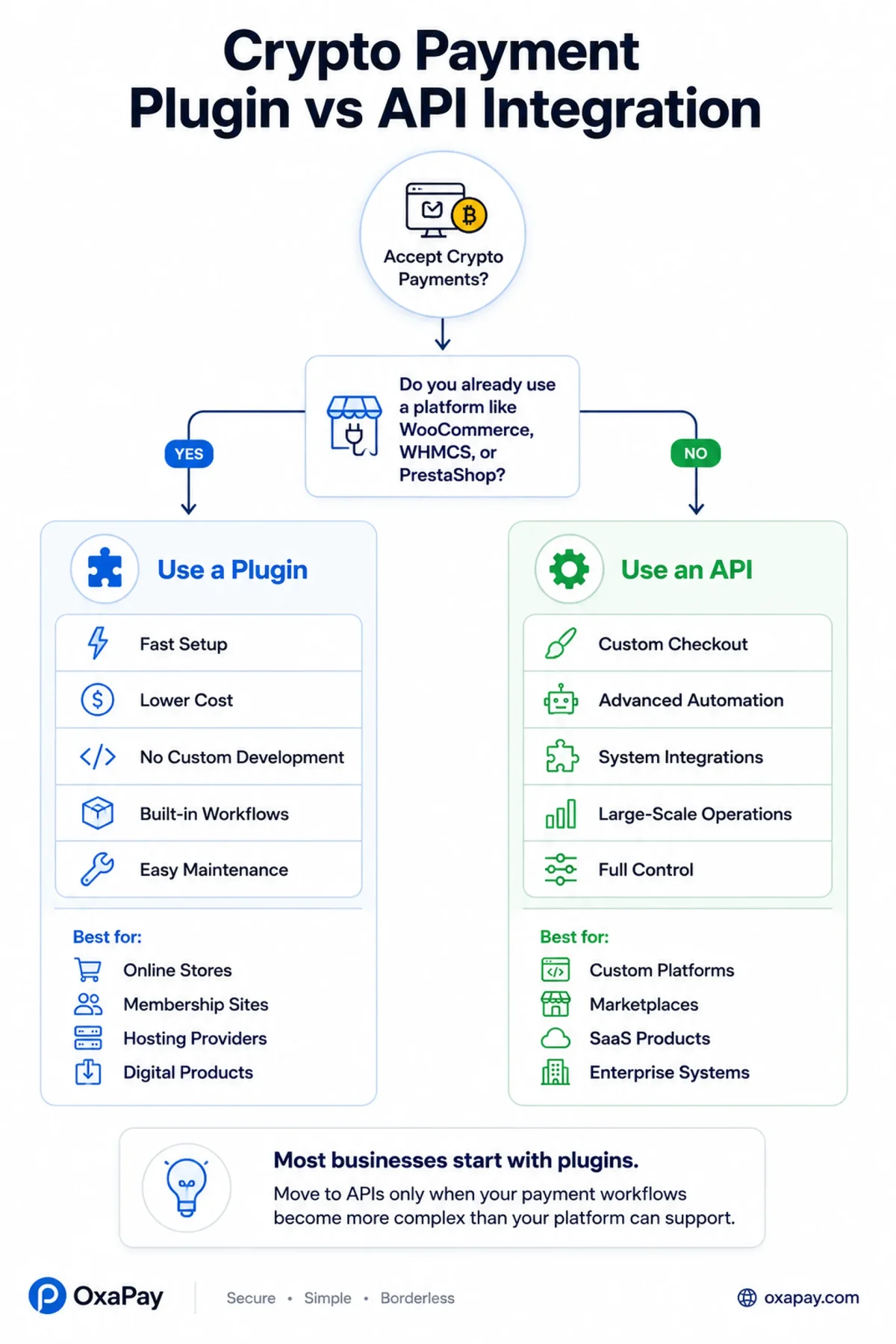
If your business already uses a supported platform and you simply want to accept cryptocurrency payments, a plugin is often the most practical solution.
An API becomes valuable when payment workflows extend beyond standard checkout processes.
When a Plugin Is the Better Choice
A plugin is usually the right option when:
- You use an existing platform such as WooCommerce, WHMCS, or PrestaShop
- You want to launch quickly
- You have limited development resources
- Your checkout process follows standard business workflows
- You want lower implementation costs
For many small and medium-sized businesses, a plugin can provide everything needed to accept crypto payments efficiently.
When an API Is the Better Choice
An API may be a better option when:
- You operate a custom-built platform
- You need unique payment workflows
- You require advanced automation
- You want custom checkout experiences
- You need deeper integration with internal systems
- You process large transaction volumes
APIs offer significantly more flexibility, but they also require development effort, testing, maintenance, and ongoing support.
For this reason, many businesses begin with plugins and later migrate to APIs as their operations grow.
Limitations of Crypto Payment Plugins
Although plugins offer significant advantages, they are not perfect solutions for every scenario.
Understanding their limitations helps businesses make realistic decisions.
Limited Customization
Plugins are designed to support a broad range of users.
As a result, businesses may have fewer options for customizing payment flows compared to custom API integrations.
Platform Dependency
Plugins depend on the platforms they support.
Major platform updates may occasionally require plugin updates or compatibility adjustments.
Restricted Workflow Control
Businesses with highly specialized operational requirements may find that plugin-based workflows do not provide enough flexibility.
Advanced Automation Constraints
While plugins automate many tasks, they may not support every automation requirement that large organizations need.
These limitations do not necessarily make plugins a poor choice. In fact, for many businesses, the benefits far outweigh the restrictions.
When Should Businesses Move from Plugins to APIs?
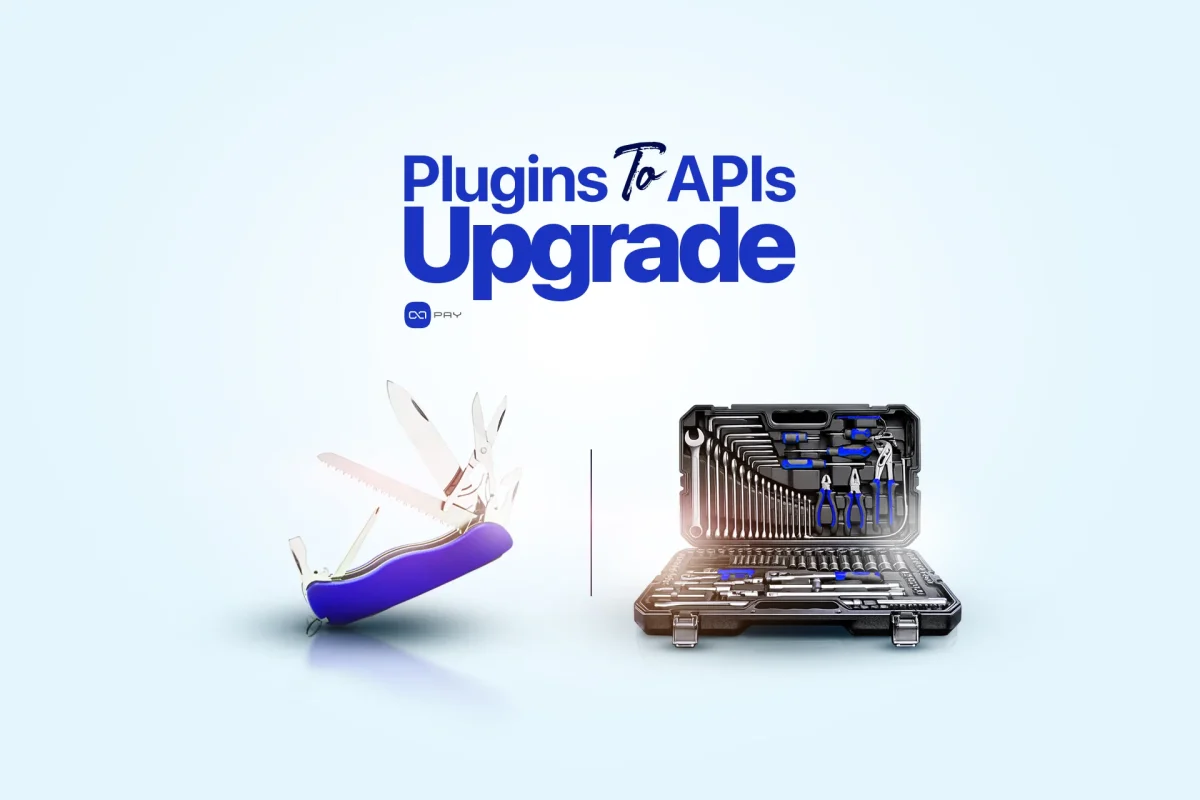
Many successful businesses start with plugins and transition to APIs only when operational requirements justify the additional complexity.
There are several signs that indicate an API integration may be the next logical step.
You Need Custom Checkout Experiences
If your business wants complete control over how customers interact with the payment process, APIs provide much greater flexibility.
You Operate Multiple Platforms
Managing payments across websites, mobile applications, internal tools, and third-party systems often requires centralized API-based infrastructure.
You Need Advanced Automation
As payment volume grows, businesses frequently require automated reporting, custom payment logic, advanced notifications, or internal workflow automation.
Your Business Has Unique Requirements
Custom invoicing systems, marketplace architectures, complex payout structures, and specialized payment experiences often require direct API integration.
The important point is that moving to an API is not necessarily an upgrade. It is a different solution designed for different operational needs.
Many businesses continue using plugins successfully for years.
How to Choose the Right Crypto Payment Plugin
Not all crypto payment plugins offer the same capabilities.
Before choosing a solution, businesses should evaluate several important factors.
Platform Compatibility
The plugin should work reliably with the platform your business already uses.
Supported Cryptocurrencies
Verify that the solution supports the cryptocurrencies your customers are most likely to use.
Security Features
Look for providers that prioritize payment security, infrastructure reliability, and transaction monitoring.
Documentation and Support
Good documentation can significantly reduce setup and troubleshooting time.
Responsive support becomes increasingly important as transaction volume grows.
Scalability
A plugin should not only solve current needs but also support future growth.
Businesses should evaluate whether the provider offers APIs, automation tools, and additional services that may become useful later.
Accept Crypto Payments with OxaPay Plugins
OxaPay crypto gateway offers a wide range of crypto payment plugins that allow businesses to integrate cryptocurrency payments directly into their existing platforms without building custom infrastructure. Each plugin is designed to fit naturally into the merchant’s workflow — from checkout and invoicing to subscriptions and content access — while ensuring automated payment verification, secure blockchain monitoring, and seamless settlement in crypto or stablecoins.
E-commerce Platforms
Integrate crypto payments directly into your online store and start accepting digital assets at checkout with minimal setup.
OxaPay WooCommerce plugin
Enables WooCommerce stores to accept cryptocurrency payments directly at checkout with automatic order synchronization and payment confirmation.
OxaPay PrestaShop plugin
Allows PrestaShop merchants to integrate crypto payments into their existing checkout flow without modifying core store logic.
OxaPay Magento plugin
Designed for enterprise-level ecommerce operations, enabling Magento stores to process cryptocurrency payments at scale with full order and payment tracking.
OxaPay OpenCart plugin
Helps OpenCart merchants accept crypto payments with a lightweight integration that maintains fast checkout performance.
OxaPay VirtueMart plugin
Enables Joomla-based stores to add cryptocurrency payment functionality without custom development or checkout redesign.
Hosting & Billing Platforms
Enable cryptocurrency payments for invoices, subscriptions, and recurring billing systems.
OxaPay WHMCS plugin
Allows hosting companies and service providers to accept crypto payments for invoices, subscriptions, and recurring services within WHMCS billing systems.
OxaPay Blesta plugin
Integrates crypto payments into Blesta billing systems, enabling automated invoice settlement and client payment tracking.
OxaPay Clientexec plugin
Supports hosting providers using Clientexec by enabling crypto payments for invoices and account billing workflows.
OxaPay WISECP plugin
Provides crypto payment capabilities for hosting and infrastructure businesses using WISECP, supporting domains, hosting plans, and services.
Membership & Content Platforms
Monetize content and subscription-based services with crypto payments and automated access control.
OxaPay Kadence Memberships plugin
Enables creators and membership-based websites to accept cryptocurrency payments for gated content and subscription access through a lightweight, block-based membership system.
OxaPay Paid Memberships Pro plugin
Supports subscription-based businesses by enabling crypto payments for membership plans, premium content, and recurring access models.
Forms & Flexible Payment Collection
OxaPay Gravity Forms plugin
Allows businesses to accept cryptocurrency payments through custom forms, making it suitable for donations, registrations, services, and flexible payment scenarios.
Digital Goods & Content Delivery
OxaPay Easy Digital Downloads plugin
Enables automated crypto payments for digital products such as software, eBooks, templates, and online courses, with integrated delivery workflows.
Key Value Behind All Plugins
Across all integrations, OxaPay plugins provide:
- Instant setup with no custom development
- Automated blockchain payment monitoring
- Real-time order and invoice synchronization
- Multi-chain crypto support
- Optional stablecoin conversion (USDT) to reduce volatility
- Secure and scalable payment processing
Conclusion
Crypto payment plugins provide one of the simplest ways for businesses to begin accepting cryptocurrency payments.
They reduce technical complexity, automate payment-related workflows, and allow organizations to integrate crypto payments into existing platforms without extensive development work.
For most online stores, membership websites, hosting companies, and digital businesses, a plugin offers the fastest path to implementation.
As operational requirements become more sophisticated, businesses can evaluate whether API-based integrations provide additional value. Until then, plugins often deliver the right balance of speed, simplicity, and functionality.



I have been using the WooCommerce plugin to accept crypto in my store for a long time. I think everything is great
A very good and differentiating point is OxaPay’s excellent support.
Your article helped me a lot, is there any more related content? Thanks!
Thank you for your support! I’m thrilled that the article was helpful to you. For more insights, you can explore additional content in OxaPay’s blog and documents. If you have any questions or need further guidance, feel free to contact our support team!